I still remember the first time I saw a flat CAD pattern come to life in 3D. It honestly felt a little magical. One minute I was staring at lines, curves, and notches on a screen, and the next minute I could see the garment draping, folding, and moving like a real piece of clothing. If you’ve ever wished you could test your sewing or design ideas before cutting fabric, you’re in exactly the right place. MULTISIZE MEASUREMENT TABLE FOR YOUR CAD SOFTWARE
Meta Description: Learn how to Turn CAD Patterns Into Realistic 3D Garments with simple steps, beginner-friendly tools, and practical tips for home sewers and fashion designers.
The good news is that Turning CAD Patterns Into Realistic 3D Garments is much easier to understand when you break it into small steps. You do not need to be a tech wizard. You just need a basic CAD pattern, the right measurements, and a little patience while you learn how the virtual cloth behaves.
If you’re a home sewer, this can help you stop wasting fabric on test garments that are almost right but not quite. If you’re a designer, 3D garment simulation can save you time, speed up approvals, and help you show ideas clearly to clients or buyers. It is one of those skills that feels fancy at first, but becomes very practical very quickly.
OTHER RELEVANT BLOG POST


Before we jump in, let me say this: 3D garment creation is not about perfection on day one. It is about learning how pattern pieces behave in a digital space so you can make better sewing and design decisions in real life. Once that clicks, everything starts to feel easier.
And if you want to go deeper, I’ve also put together a course that can help you build confidence step by step: CONVERT YOUR PATTERN DRAFTING SKILLS TO REVENUE.
Now let’s walk through the process in a simple, friendly way.
What Does It Mean to Turn CAD Patterns Into Realistic 3D
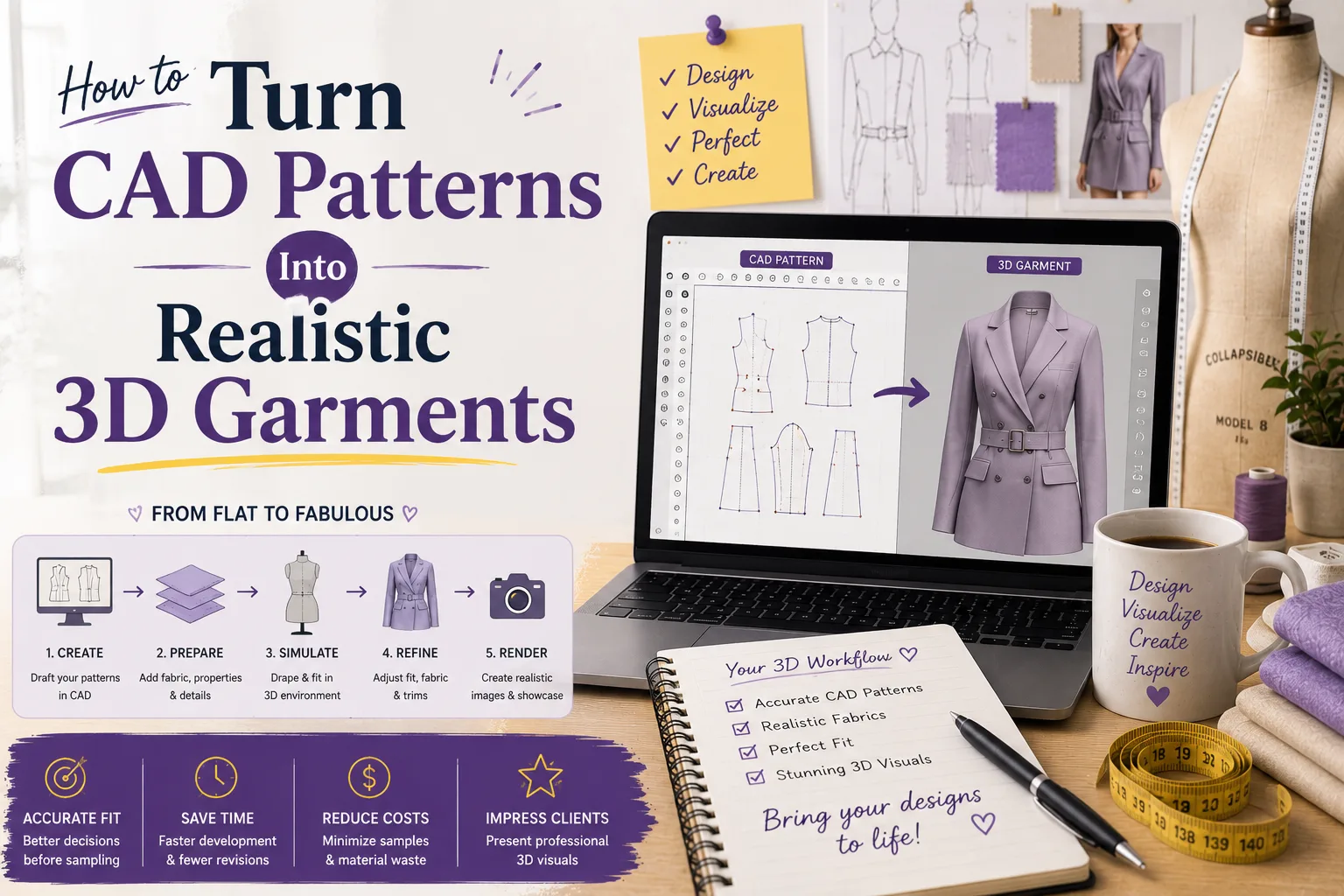
In plain language, you are taking a flat 2D pattern from CAD software and using 3D simulation software to wrap that pattern around a virtual mannequin or avatar. The software then shows you how the garment fits, hangs, stretches, and moves.
Think of it like making a digital mock-up before you ever touch fabric. This is especially helpful if you draft patterns in software such as CLO 3D, Browzwear, Style3D, Optitex, or similar tools that support garment simulation. By visualizing the fit digitally, you can identify issues like restricted movement or excessive volume that might not be obvious on a flat 2D screen.
Helpful external references: CLO 3D, Browzwear, and Optitex.
Why Turning CAD Patterns Into Realistic 3D Garments Is So Useful
OTHER RELEVANT BLOG POST
Turning CAD patterns into realistic 3D garments is revolutionizing the fashion industry by bridging the gap between design and production. Here is why it is essential:
- It saves time: You can see fit issues before sewing, reducing the need for multiple physical prototypes.
- You can also save fabric: Fewer physical samples mean less waste, making your design process more sustainable.
- It improves communication: Clients and team members understand the design faster when they see it in a 30-degree view.
- And supports better drafting: You can spot sleeve balance, neckline issues, and ease problems earlier in the cycle.
- It helps you sell ideas: Clean visuals make your work look professional and ready for marketing.
For home sewers, that means less frustration and more successful projects. For designers, that means a smoother workflow, faster decision-making, and a significant reduction in overhead costs.
Step-by-Step: How to Turn CAD Patterns Into Realistic 3D Garments
1. Draft or import your pattern
Start with a clean, accurate pattern. If you are drafting in CAD, make sure your seam lines, grainlines, notches, and measurement points are correct. If you already have a pattern file (like a DXF or PDF), import it into your 3D software. Ensure the scale is correct during import to avoid sizing errors.
2. Check the measurements
Before you simulate anything, compare the pattern measurements to your size chart or target body measurements. This is where a good measurement table helps a lot. Small errors here can create big fit problems in 3D. Check the bust, waist, and hip circumferences against the avatar’s dimensions.
3. Assign fabric properties
Fabric behavior matters. A stiff cotton will not drape like jersey or silk. Most 3D software lets you enter fabric stretch, weight, thickness, and bending properties. Many programs even offer a library of presets for common fabrics like denim, wool, or chiffon. If the fabric settings are wrong, the simulation will look wrong too.
4. Sew the pattern pieces virtually
In the software, you link the seam edges together just like you would sew them in real life. You define which edge of the front bodice connects to the back bodice at the side seam. Once all seams are “stitched,” the program drapes the pieces onto the avatar using gravity simulation.
5. Watch how the garment behaves
This is the fun part. Look for drag lines, pulling, excess volume, collapsing areas, and awkward folds. Use “stress maps” if your software has them to see where the garment is too tight or too loose. Check the shoulder, bust, waist, hip, and sleeve areas carefully.
6. Adjust and re-simulate
Go back to the pattern and make changes. You might need to alter ease, shift darts, reshape a sleeve cap, or refine a side seam. The beauty of 3D is that you can see the results of these changes instantly without re-cutting fabric. Run the simulation again to verify the fix.
7. Export visuals or technical files
Once your garment looks right, you can export high-quality renders for your portfolio, technical flats for production, or the final pattern files. These visuals are great for presentations, online shops, or production handoff to manufacturers.
Tools That Make the Process Easier
You do not need every tool on the market. A simple setup can work well if you stay organized. Consider your budget and specific needs—whether you are a hobbyist or a professional designer.
- CAD pattern software: Gerber, Lectra, Seamly2D, TUKAcad, or similar.
- 3D simulation software: CLO 3D, Browzwear, Style3D, Optitex.
- Measurement table: A multisize chart that matches your brand or client needs.
- Avatar or body form: Custom or standard-size avatars that represent your target customer.
- Notebook or worksheet: Great for tracking fit changes and simulation results over time.
Tips for Better Results
- Start with simple garments like sleeveless tops, skirts, or straight dresses before moving to complex outerwear.
- Use clean pattern pieces with clear seam allowances and labels to avoid confusion during the virtual sewing stage.
- Match your fabric settings to the actual cloth as closely as possible; consider using a fabric testing kit if available.
- Keep your sizing consistent across all pattern pieces to ensure the garment balances correctly on the avatar.
- Test one change at a time so you know exactly what improved the fit.
- Save versions as you go so you can compare results and revert if a change doesn’t work out.
Frequently Asked Questions (FAQ)
Do I need a powerful computer for 3D garment simulation?
Yes, 3D simulation is resource-intensive. While basic patterns might run on a standard laptop, a dedicated graphics card (GPU) and at least 16GB of RAM are recommended for smooth performance and high-quality rendering.
Can I use 3D garments for actual production?
Absolutely. Most professional 3D software allows you to export the finalized 2D patterns in industry-standard formats like DXF-AAMA or DXF-ASTM, which can be sent directly to factories for cutting and sewing.
Is 3D simulation accurate for all fabric types?
It is very accurate for most woven and knit fabrics, provided the physical properties (stretch, weight, bend) are correctly entered. However, extremely complex materials like heavy fur or highly structured architectural fabrics may require more advanced settings.
How long does it take to learn 3D garment software?
If you already understand pattern drafting, you can learn the basics of simulation in a few weeks. Mastering high-end rendering and complex detailing usually takes a few months of consistent practice.
Every digital stitch brings you one step closer to a perfect physical garment. By mastering these tools, you’re not just designing clothes; you’re engineering fit and style with precision.